Pages

Monday, September 7, 2009

Get Your Bootloader Back

This my post about how to get you bootloader back, in case Windows erased it. Easy way out guys, just follow this :

1. Use your ubuntu live CD
2. Go to Terminal then type
sudo grub

3. Find where your grub is by typing
grub> find /boot/grub/stage1

4. Then typed
root (hd0,4)

setup (hd0)

root(hd0,4) means turn to your GRUB directory at first harddrive on fifth partition
setup (hd0) means installing GRUB on your first harddrive

5. Then typed quit
grub> quit

6. Reboot your computer
7. It's Done!

Note:
This tutorial for Linux Ubuntu Jaunty Jackalope Version
Read more...

Thursday, September 3, 2009

Free Review For All Computer Technology


In accordance with current needs, improve the knowledge in science is essential. Moreover, viewed from the very development of computer technology. Today many websites which provide articles about the development of computer technology.

The following is a link provided by a friend. This link provides several articles about the latest computer technology. This article from the web can take for free. So that it will help us to improve the knowledge of computer technology.

Please check this link to find out how far the development of computer technology at this time. May provide benefit to you all.


Read more...

Monday, August 24, 2009

Access Plurk Within PlurkAir


Plurk is a social microblogging, just same kind of twitter. But it is little bit "cute" on telling the story of life line.
Now, Plurk not just can access on the web. It is can be access on your desktop. You just need to install PlurkAir and Adobe Air.


Read more...

Saturday, August 22, 2009

Musictracker on Pidgin in Ubuntu Linux


I have tried musictracker on Pidgin in my ubuntu. It is just same as Pidgin on Windows.
Code:
sudo apt-get install pidgin-musictracker

and turn the plugin on in Pidgin.
Ps: I am using Rythmbox


Read more...

Monday, August 3, 2009

Linux Tree


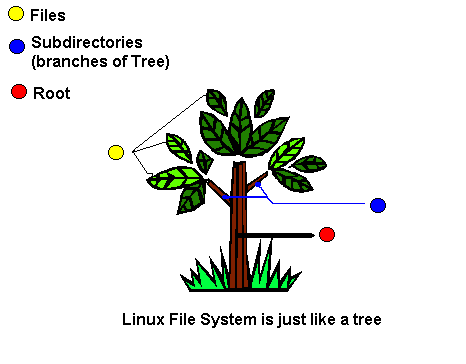
From above Figure you can see there is only one root (/ directory) for tree, this root of tree divided into several branches (Subdirectories) and branches have different flowers, fruits, leaves etc (Files).
Read more...

LinkWithin

Related Posts Plugin for WordPress, Blogger...