Pages

Monday, August 24, 2009

Access Plurk Within PlurkAir


Plurk is a social microblogging, just same kind of twitter. But it is little bit "cute" on telling the story of life line.
Now, Plurk not just can access on the web. It is can be access on your desktop. You just need to install PlurkAir and Adobe Air.


Read more...

Saturday, August 22, 2009

Musictracker on Pidgin in Ubuntu Linux


I have tried musictracker on Pidgin in my ubuntu. It is just same as Pidgin on Windows.
Code:
sudo apt-get install pidgin-musictracker

and turn the plugin on in Pidgin.
Ps: I am using Rythmbox


Read more...

Monday, August 3, 2009

Linux Tree


From above Figure you can see there is only one root (/ directory) for tree, this root of tree divided into several branches (Subdirectories) and branches have different flowers, fruits, leaves etc (Files).
Read more...

Friday, June 26, 2009

File Extension TS

File Extension TS is stream transport protocol used in video streaming technology. At this time we have often seen the video stream, such as Youtube. The technology using Macromedia Flash Player.

This file extension TS is temporary, normally open automatically and immediately deleted when finished streaming. Technology-based file extension TS has been used in many fields because of the voice synthesizer the actual and the like with Wavelength instrumens.

Problem which is often found in the file extension TS is the use of any application program to access them. To find out the correct application program is required to use a driver detective. A driver detective can help you to find out the appropriate application program to open a file extension.


Read more...

Monday, April 27, 2009

Track Your Listening On your Pidgin's Status

This how to tracking your listening to your Pidgin's status. I'm Using Pidgin for Windows XP. You just add an plugins on your Pidgin. So, the track what you are listening could see on your status.
First we just need a Pidgin and a plugins namely musictracker. I'm using pidgin versi 2.5.4 and musictracker 0.4.1. So, first of all just download Pidgin in this link and MusicTracker on that link :)

Installation :
1. If you already download the Pidgin then run the musictracker-0.4.1-win32.exe
2. Then go to Pidgin select Tools-->Plugins
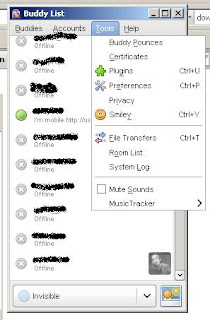
3. Then check for Music Tracker 0.4.1
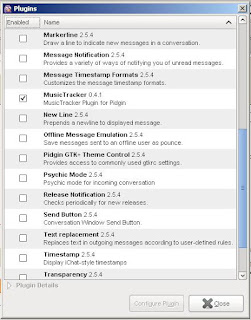
4. It's Done!!

Note:
Currently supported players: Amarok, Rhythmbox, Audacious, XMMS, MPC/MPD, Exaile, Banshee, Quod Libet on Linux. Winamp, Windows Media Player (9+), iTunes, Foobar2000 (incomplete support) on Windows.



Read more...

LinkWithin

Related Posts Plugin for WordPress, Blogger...